

18,000+
detections performed

Kanshi uses AI to decide whether a form submission is valid before it reaches your CRM, inbox, or database.
Kanshi sits between your website forms and your business systems, making the decision before bad leads enter the pipeline.
It is an AI lead decision layer between your forms and the systems that create work for your team.
Kanshi intercepts form submissions before processing.
Submission data is sent to the AI decision engine.
AI returns a decision: allow, reject, or optionally flag for review.
Only approved submissions continue into email, CRM, database, or redirect flows.
Modern fake leads often look human. They use normal language, avoid obvious keywords, and still waste sales and operations time. Kanshi evaluates meaning, context, and lead quality before the submission reaches your systems.
User submits a form
Intent and context are evaluated
Allow, reject, or flag
Only valid leads proceed
Valid lead enters system
Blocked before entry
Optional review
Low-quality or fake submissions are stopped before sales teams spend time on them.
Valid leads are allowed through while questionable submissions are rejected or flagged.
Your CRM, inbox, and database receive fewer fake records and irrelevant enquiries.
Teams spend less time triaging submissions that were never real business opportunities.
Kanshi gives teams a live view of detections, site activity, blocked entries, legitimate submissions, and reviewable actions across protected websites.
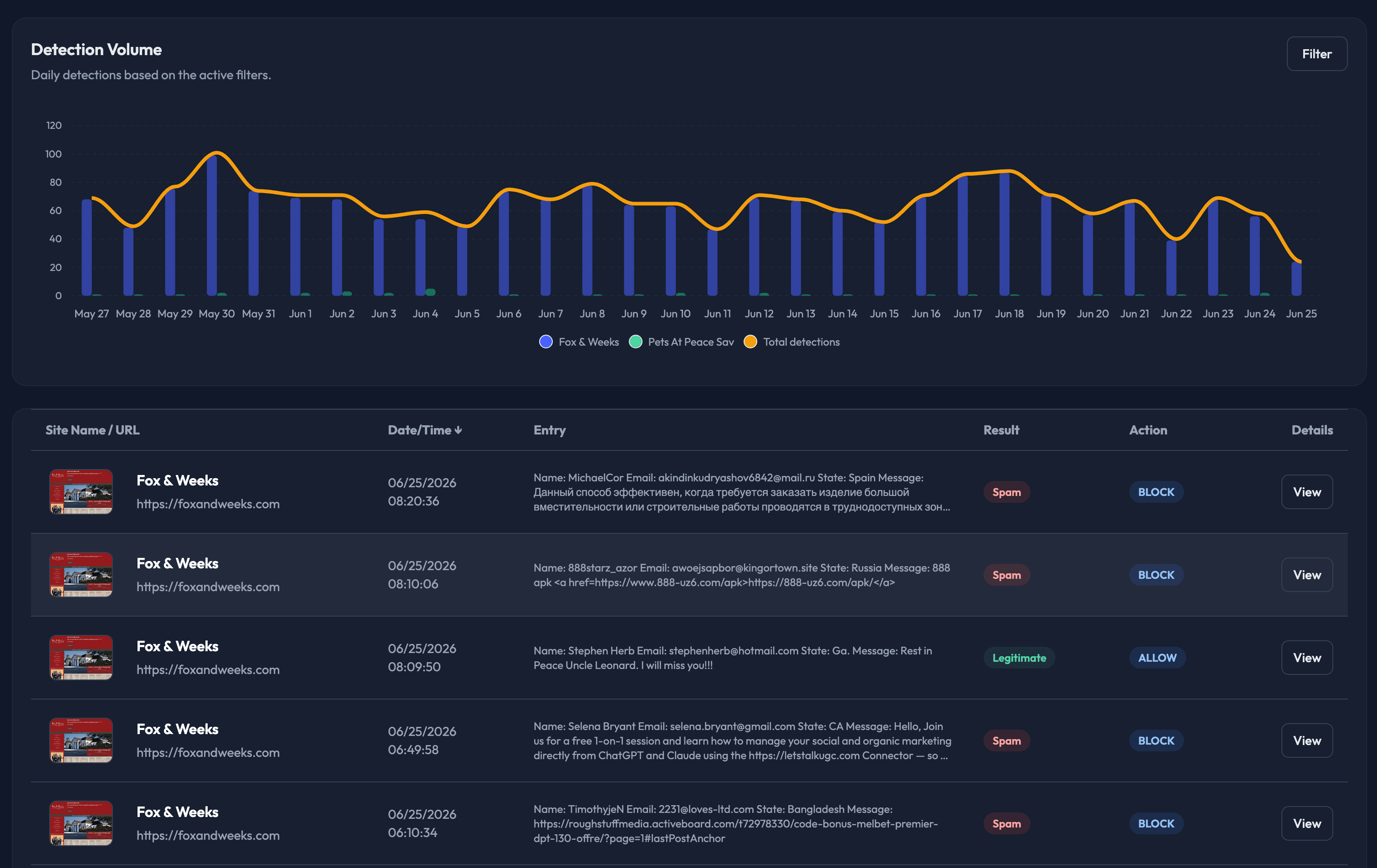
Kanshi sits between your website forms and business systems, evaluating intent and context before the lead reaches your CRM, inbox, or database.
Kanshi receives the form submission before it triggers CRM records, email notifications, database writes, or redirect flows.
Each lead is analyzed for intent, meaning, and business context, then classified as valid, rejected, or review-worthy.
Your workflow receives a decision, confidence level, category, and reason before the submission enters downstream systems.
Kanshi analyzes each form submission before it reaches your CRM, inbox, database, or redirect flow, then returns a decision your workflow can act on.
Kanshi evaluates meaning, context, and intent instead of relying on keywords or obvious spam patterns.
Approved submissions continue to email, CRM, databases, and redirect flows. Rejected leads are stopped before entry.
Every detection includes the reason, category, confidence level, and action so your team knows what happened.
Return allow, reject, or needs-review decisions with confidence scores your workflow can act on.
Reduce fake enquiries, low-quality submissions, and human-like messages that still never convert.
Use the WordPress plugin for form interception or the API for custom lead pipelines and submission workflows.
Send a realistic inquiry through the website backend and inspect the full Kanshi API response exactly as it comes back.
You can try Kanshi live, this form emulates a contact form present on the Kanshi.works website, enter your inquiry and see how Kanshi reacts to it!
The response below is rendered from the server route after it talks to Kanshi.
{
  "result": "Response will appear here",
  "submission_reason": "Submit the form to see the live Kanshi decision.",
  "spam_category": null,
  "spam_category_description": null,
  "confidence_level": null
}The Kanshi WordPress plugin gives website owners a simpler path to connect WordPress forms and inquiry flows into Kanshi. It is built for easier integration, faster setup, and smoother adoption when you want protection without starting from a custom implementation.
Kanshi fits into existing workflows without forcing a fragile setup. Use the documented API, configure webhooks, connect review pipelines, and rely on an architecture designed for production use.
Connect Kanshi to internal tools, CRMs, queue processors, or custom forms without depending on a single plugin path.
Send events into review queues, alerting systems, or business workflows so your team can act on decisions immediately.
Designed for production environments where reliability, clear decisioning, and maintainable integration patterns matter.
Work with a responsive team that can help clarify integration steps, rollout choices, and operational questions.
Kanshi sits between your forms and your business systems, deciding whether a submission should be allowed into your CRM, inbox, database, or follow-up workflow.
Browse the most relevant guides to see how Kanshi controls which submissions enter your workflow.
Keep discussion threads relevant with context-aware moderation before low-value posts go public. Read more
Screen blog and page comments for relevance, authenticity, and promotional intent. Read more
Reduce fake reviews and protect trust signals before they affect buying decisions. Read more
Check whether a comment feels authentic enough to publish or send to moderation. Read more
Catch low-intent inquiries and AI-written outreach before they reach sales follow-up. Read more
Identify synthetic engagement that looks human but adds no real value to the page. Read more
The goal of the website is simple: help you understand Kanshi, start the trial, and get your first protected workflow running without weeks of setup.
Create your account, add the website you want to protect, and unlock the API key for that site immediately.
Place Kanshi between your submission flow and your final handler so each inquiry gets a fast go / no-go decision.
See what was allowed, blocked, or flagged with plain-language reasoning your team can verify.
Kanshi is built to get websites protected without dragging integration into a long project. Use the API path when you want full control, or start with the WordPress plugin when you want an easier install path into the Kanshi Ecosystem.
Kanshi protects different kinds of websites because it learns what each one is actually for, then judges incoming interactions against that purpose.

Kanshi can tell the difference between a real, sensitive service inquiry and an unrelated marketing pitch trying to use the same contact form.

A message that might sound genuine somewhere else can be flagged when it has nothing to do with castings, parts, restoration, or quote requests.

Personal sites can filter low-quality interactions while preserving the interviews, speaking requests, and reader messages that actually belong.
Start with one 10-day free trial, no credit card required. Test Kanshi on real submissions, review the decisions, and upgrade only when the filtering proves useful.
A practical first layer of AI filtering for business inquiry forms, quote requests, and contact pages.
No credit card required.
Higher volume plus deeper sender-level detection for convincing spam, fake leads, and suspicious contact details.
No credit card required.
Kanshi is built for the space between obvious junk and leads that look real but never convert.
No. Traditional filters look for patterns and keywords. Kanshi decides whether a form submission is valid enough to enter your CRM, inbox, database, or follow-up workflow.
Kanshi evaluates the website, form context, submitted message, intent, and lead quality signals before returning allow, reject, or flag.
Allowed submissions continue to email notifications, CRM systems, database storage, and redirect flows. Rejected submissions are blocked before they enter those systems.
Yes. Kanshi is especially useful for lead forms, quote requests, appointment bookings, service enquiries, and support requests where fake submissions create real work.
No. Start with one 10-day free trial, then upgrade during or after the trial when Kanshi has proven useful for your website.
Start with a 10-day free trial, no credit card required. Review the decisions, see what Kanshi would filter, and upgrade only when the protection proves useful for your website.